myBB ကုိ localhost မွာ အင္စေတာ့လုပ္နည္းပါ။ ဘာမွမခက္ပါဘူး။ လုိအပ္တဲ့ Tool ေတြကုိအရင္သြင္းသြားရပါမယ္။ Read my previous post. ေနာက္ myBB package ကုိ Official Site ကေနေဒါင္းထားဖုိ႔လုိပါလိမ့္မယ္။ က်န္တာကုိေတာ့ မရွင္းျပေတာ့ပါဘူး။ ပုံေလးေတြကုိၾကည့္ျပီး လုပ္တတ္သြားမယ္လုိ႔ ထင္ပါတယ္။
12/31/2013
Hash Code Cracker 1.2.1
Breakthesecurity.com ကေန ထုတ္ထားတာ။ Ethical Hacking အတြက္ျဖစ္ပါသတဲ့။ md5 Password ေတြကုိ Crack ႏုိင္မယ္။ MD5 Hash ေတြကုိလည္း Generate လုပ္ေပးႏုိင္မယ္။ အျခား ဘာညာ function ေတြလည္းပါေသးတယ္။ ဟီး။
[Download]
Read more »
[Download]
Labels:
MD5,
Password Cracking Tools
12/30/2013
Dork Searcher
Dork ေတြ Google မွာ Typing လုပ္ျပီး ရွာမေနနဲ႕ေတာ့ လုိခ်င္တာကုိ select လုပ္ျပီး ရွာရုံပဲ။ အဓိက ရွာေပးမွာက SQLi Vul ျဖစ္ေနတဲ့ဆုိဒ္ေတြကုိ ရွာေပးမွာပါ။ ကုိယ့္ဆီမွာ Dork list ေတြရွိေနရင္လည္း ထပ္ေပါင္းလုိ႔ ရေသးတယ္။
[Download]
Read more »
[Download]
Labels:
Google Dork,
Hacking Tools,
Web Hacking
12/27/2013
Node Zero [Pen-testing Distro]
[Screenshot]
[Download]
Labels:
Pen-Testing
12/26/2013
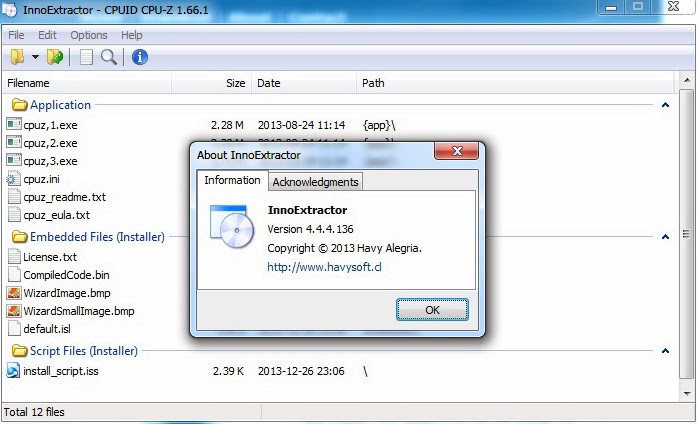
InnoExtractor v4.4.3.135 [Unpacker and decompiler for Inno Setup installers]
InnoExtractor ဆုိတာကေတာ့ Tool တစ္ခုရဲ႕အထဲကဖုိင္ေတြကုိ ၾကည့္ႏုိင္တဲ့ဟာပါပဲ။ ဒီေကာင္နဲ႔ Software တစ္ခုရဲ႕ အထဲမွာရွိတဲ့ဖုိင္ေတြကုိ ၾကည့္လုိ႔ရမွာပါ။ မိမိလုိခ်င္တဲ့ေနရာမွာ စိတ္ကူးေပါက္ရာသုံးႏုိင္ပါတယ္။ Use you Brain xD
Features:
- Simple and friendly GUI.
- Open installers into the application with only drag and drop executables from Windows Explorer.
- Explore the internal content (files and more) of the installer.
- Extract the embedded files and script to a local folder, to a zip package or to a self-extracting module (portable).
- Decompiles the "CompiledCode.bin" file of the Installer to get the assembly code, corresponding to the "Code" script section (for advanced users only).
- Open internal files of the installer into the same application.
- Perform file searches by keyword.
- Input panel, that allows you to enter a valid password to extract encrypted installers.
- Properties panel to see advanced information about the installer.
- History for recently opened installer.
- Other miscellaneous options.
- Support older and latest versions of Inno Setup.
- Support older and latest versions of InnoUnp.
- Full Unicode support.
- Application available in multiple languages.
- Much more!
Download: Mediafire Solidfiles
Read more »
Features:
- Simple and friendly GUI.
- Open installers into the application with only drag and drop executables from Windows Explorer.
- Explore the internal content (files and more) of the installer.
- Extract the embedded files and script to a local folder, to a zip package or to a self-extracting module (portable).
- Decompiles the "CompiledCode.bin" file of the Installer to get the assembly code, corresponding to the "Code" script section (for advanced users only).
- Open internal files of the installer into the same application.
- Perform file searches by keyword.
- Input panel, that allows you to enter a valid password to extract encrypted installers.
- Properties panel to see advanced information about the installer.
- History for recently opened installer.
- Other miscellaneous options.
- Support older and latest versions of Inno Setup.
- Support older and latest versions of InnoUnp.
- Full Unicode support.
- Application available in multiple languages.
- Much more!
Download: Mediafire Solidfiles
Labels:
Cracking,
Decompiler
iOS 7.x Jailbreak [evasi0n7]
Blog ေတြထဲမွာ ပလူပ်ံေနတာပဲ။ iOS7 ကုိ Jailbreak လုပ္လုိ႔ရတဲ့အေၾကာင္း။ ကြ်န္ေတာ္ကေတာ့ iDevice မဟုတ္ေတာ့ သိပ္ဂရုမစုိက္မိပါဘူးဗ်ာ။ ဒါေပမယ့္ iDevice ပရိတ္သတ္ေတြမနည္းဘူးဗ်။ Hacking Tool ေတြခ်ည္းတင္ေနတဲ့ႏုိင္ငံျခား ဘေလာ့တစ္ခုမွာေတြ႕လုိ ျပန္ရွယ္လုိက္တာပါ။ evasi0n7 ဆုိတာက နာမည္ၾကီး Jailbreak လုပ္တဲ့အဖြဲ႕ျဖစ္ပါတယ္။ ဒါကေတာ့ ခရစ္စမစ္အမွီလက္ေဆာင္လုိ႔ဆုိပါတယ္။ ဒီ Tool ကုိသုံးဖုိ႔ ေအာက္က Requirement ရွိရပါမယ္။
A computer, running Windows (XP minimum), Mac OS X (10.6 minimum) or Linux (x86 / x86_64)
iTunes installed if you’re running Windows
An iPhone, iPad or iPod running iOS 7.0 through 7.0.4 (you may check in Settings / General / About => Version)
A USB cable to connect the device to the computer
evasi0n7 အေနနဲ႔ iOS 7, iOS 7.0.1, iOS 7.0.2, iOS 7.0.3, iOS 7.0.4 စတဲ့ iOS ေတြကုိ Support လုပ္ပါမယ္။ သူနဲ႔ဆက္ႏြယ္တဲ့ ေအာက္ပါ Device ေတြအားလုံး အက်ဳံးဝင္ပါတယ္။
Read more »
A computer, running Windows (XP minimum), Mac OS X (10.6 minimum) or Linux (x86 / x86_64)
iTunes installed if you’re running Windows
An iPhone, iPad or iPod running iOS 7.0 through 7.0.4 (you may check in Settings / General / About => Version)
A USB cable to connect the device to the computer
evasi0n7 အေနနဲ႔ iOS 7, iOS 7.0.1, iOS 7.0.2, iOS 7.0.3, iOS 7.0.4 စတဲ့ iOS ေတြကုိ Support လုပ္ပါမယ္။ သူနဲ႔ဆက္ႏြယ္တဲ့ ေအာက္ပါ Device ေတြအားလုံး အက်ဳံးဝင္ပါတယ္။
- iPhone 5s, iPhone 5c, iPhone 5, iPhone 4S, iPhone 4, iPhone 3GS
- iPad Air, iPad 4, iPad 3, iPad 2
- Retina iPad mini, iPad mini
- iPod touch 5G
Labels:
iOS
Reverse Engineering [Explaination]
In Brief
Reverse Engineering ဆုိတာကုိ Reverse Engineering လုိ႔ပဲမွတ္ထားတာေကာင္းပါတယ္။ တခါတေလ Computer Term ေတြကုိျမန္မာလုိတုိက္ရုိက္ျပန္ရင္ ကဂ်ဳိးကေဂ်ာင္ႏုိင္လြန္းပါတယ္။ Reverse Engineering ဆုိတာ Device ဒါမွမဟုတ္ System တစ္ခုရဲ႕ Structure ကုိ Analysis လုပ္ျခင္းလုိ႔ ေယဘုယ်အားျဖင့္သတ္မွတ္ႏုိင္ပါတယ္။ဥပမာဗ်ာ ေလယာဥ္တစ္ခုရဲ႕တည္ေဆာက္ပုံကုိ ေသခ်ာနားလည္ဖုိ႔ အဲဒီေလယာဥ္ကုိ ျဖဳတ္ျပီး Analysis လုပ္မယ္။ disassembling လုိ႔ေခၚပါတယ္။ ေဆာ့ဝဲလ္ေတြကုိ Crack တယ္ဆုိတာလည္း ဒီသေဘာတရားပါပဲ။ ရည္ရြယ္ခ်က္ကေတာ့ အဲဒီ Hardware, Device, Tool တစ္ခုရဲ႕ အားနည္းခ်က္ (bug) ကုိရွာေဖြဖုိ႔၊ ပုိေကာင္းတဲ့ေနာက္တစ္ခုထပ္ထြင္ႏုိင္ဖုိ႔အတြက္ပါ။ Reverse Engineering ေၾကာင့္ ကြ်န္ေတာ္တုိ႔ ပုိေကာင္းတဲ့ ေမာ္ဒယ္ျမင့္ေလယာဥ္ေတြ။ ေဆာ့ဝဲလ္ဗားရွင္းေတြ၊ ထြက္လာတာေပါ့ေနာ္။
Reasons for reverse engineering:
Interfacing- မတူညီတဲ့ System ႏွစ္ခုကုိ ဆက္သြယ္ေပးဖုိ႔ ၾကားခံစနစ္အျဖစ္အသုံးခ်ရာမွာ Reverse Engineering ကုိအသုံးခ်ပါတယ္။ ဥပမာ iPod Device ကုိ Windows ကြန္ပ်ဴတာမွာ သိေအာင္ ဘာညာ။
Military or commercial espionage- စစ္ဘက္ဆုိင္ရာေတြမွာဆုိရင္ ရန္သူေတြရဲ႕ နည္းပညာနမူနာ prototype ေတြကုိ ခုိးျပီး dismantling လုပ္မယ္။ ျပီးရင္ အဲဒီထက္ပုိေကာင္းတဲ့ Device ကုိထြင္မယ္။ ဥပမာ အေမရိကန္က F35 ေလယာဥ္ထြင္ထားတယ္ဆုိရင္ ျမန္မာႏုိင္ငံက အဲဒီထက္အဆင့္ျမင့္တဲ့ ကုိယ္ေပ်ာက္ေလယာဥ္ အသံထက္ 50 ဆျမန္တဲ့ေလယာဥ္ထြင္မယ္။ သူတုိ႔နမူနာေလယာဥ္ရဲ႕ နည္းပညာေတြကုိ Reverse လုပ္ျပီးေတာ့။ ဟီး
Improve documentation shortcomings-အခ်ဳိ႕ေသာ Original designer ေတြက သူတုိ႔ရဲ႕ System ဒါမွမဟုတ္ Operation အတြက္ ထပ္ျပီး Develop လုပ္ဖုိ႔ Function မပါလာဘူး။ ဒီေနရာမွာ Reverse Engineering Software ေတြနဲ႔ Develop လုပ္ႏုိင္ေစတယ္။
Obsolescence-တခါတေလမွာ Integrated circuits ေတြဟာ design obsolete ျဖစ္လာတယ္။ နည္းပညာ ပေပ်ာက္ကုန္တာေပါ့ေနာ္။ သူကုိေနာက္ထပ္ develop လုပ္ဖုိ႔မလြယ္ကူေတာ့ဘူး။ အဲဒိအခ်ိန္မွာ Reverse Engineering နဲ႔ Design အသစ္ဆြဲႏုိင္ေစတယ္။
Product Security Analysis-ကုိယ္ေရးထားတဲ့ Tool/Software တစ္ခုရဲ႕ Security ကုိစစ္ေဆးဖုိ႔ အသုံးခ်ႏုိင္ပါတယ္။ ဥပမာ Copy Protection လုပ္ထားတာမ်ဳိး။
Bug fixing-ဒါေတာ့ အားလုံး သိထားၾကတဲ့အတုိင္းပါပဲ။ Tool/Software/Device ေတြဆုိတာ 100% perfect ဆုိတာမရွိဘူးေလ။ ဒီေတာ့ bug fix လုပ္ဖုိ႔လုိအပ္ပါတယ္။
Creation of unlicensed/unapproved duplicates-ဒါကုိေတာ့ Computer ေလာကမွာ Clone လုိ႔ေခၚပါတယ္။ ဥပမာ iPhone 5 အတု၊ Galaxy s4 အတု ဘာညာေပါ့။
Competitive technical intelligence-ကုိ္ယ့္ျပိဳင္ဖက္က ဘာေတြလုပ္ေနသလဲဆုိတာသိရဖုိ႔ အသုံးခ်ပါတယ္။ ဥပမာ Samsung က iPhone 5 နည္းပညာကုိခုိးခ်ပါတယ္။ iPhone ကလည္း Samsung နည္းပညာကုိခုိးခ်ပါတယ္ ေျပာသံေတြၾကားေနရတာပဲ။ ဒါပဲေနလိမ့္မယ္။
Usage of Reverse engineering
Reverse engineering ကုိအသုံးခ်တဲ့ေနရာေတြအမ်ားၾကီးပါပဲ။ အလြယ္ကူဆုံးဥပမာကေတာ့ ကြ်န္ေတာ္တုိ႔ Tool ေတြကုိ Crack လုပ္ထားတာပါပဲ။ Windows 8 ထြက္တာမၾကာေသးဘူး။ Crack Version ကထြက္လာျပီ။ Adobe Photoshop CS6 လာထား Crack version ရွိတယ္။ အဲသလုိေပါ့ဗ်ာ။ ဟီး။ ဒုတိယ ကမၻာစစ္တုန္းက အေမရိကန္ေတြ ဂ်ပန္ႏုိင္ငံေပၚကုိ ဗုံးၾကဲခဲ့တဲ့ B-29 ဗုံးၾကဲေလယာဥ္ဆုိတာ နာမည္ၾကီးပါပဲ။ အဲဒါကုိ ဆုိဗီယက္ေတြမွာမရွိေပမယ့္ ေကာ္ပီကူးျပီး Tu-4 ကုိထြင္လုိက္တယ္။ အားလုံးနီပါးတူပါသတဲ့။ Reverse Engineering နည္းနဲ႔ေပါ့။ တရုတ္ေတြဆုိ Reverse Engineering နဲ႔ အေနာက္တုိင္းက နည္းပညာေတြကုိ ခုိးခ်တာ ကမၻာအသိပါပဲ။ Cracking စာအုပ္ေတြဖတ္ၾကည့္လုိက္ဗ်ာ။ Tool တစ္ခုကုိဘယ္လုိ Crack ရမလဲဆုိတာ Tool ေတြ၊ နည္းေတြအမ်ားၾကီးေတြ႕ရလိမ့္မယ္။ decompiler, disassembler ေတြေနာက္ထပ္ အမ်ားၾကီးပါပဲဗ်ာ။
Legality
Reverse Engineering နည္းပညာကုိ မဟုတ္တဲ့ေနရာမွာ သုံးဖုိ႔ သူမ်ားႏုိင္ငံေတြမွာေတာ့ ခြင့္မျပဳပါဘူး။ ဒီအတြက္ Copyright Law ေတြရွိပါတယ္။ ကုိယ့္ျမန္မာႏုိင္ငံမွာေတာ့ ေသခ်ာမရွိေသးဘူးထင္တာပဲ။ ကုိယ္လုပ္လုိက္တဲ့ Tool ကုိ သူမ်ား Crack လုိက္ရင္ ဘယ္နား Complain တက္ရမယ္မသိဘူး။ ဒါကေတာ့ အမ်ားၾကီးလုိအုံးမယ္။ ထားပါေတာ့။ ေအာက္မွာ US ႏုိင္ငံမွာ သတ္မွတ္ထားတဲ့ အေျခေနတစ္ခုအတြင္း Reverse Engineering နည္းပညာကုိ အသုံးခ်ႏုိင္ပုံကုိ ေလ့လာႏုိင္ပါတယ္။
(f) Reverse Engineering.—
(1) Notwithstanding the provisions of subsection (a)(1)(A), a person who has lawfully obtained the right to use a copy of a computer program may circumvent a technological measure that effectively controls access to a particular portion of that program for the sole purpose of identifying and analyzing those elements of the program that are necessary to achieve interoperability of an independently created computer program with other programs, and that have not previously been readily available to the person engaging in the circumvention, to the extent any such acts of identification and analysis do not constitute infringement under this title.
(2) Notwithstanding the provisions of subsections (a)(2) and (b), a person may develop and employ technological means to circumvent a technological measure, or to circumvent protection afforded by a technological measure, in order to enable the identification and analysis under paragraph (1), or for the purpose of enabling interoperability of an independently created computer program with other programs, if such means are necessary to ach.
Read my post@ http://www.4sectors.com/forum/showthread.php?tid=1453&pid=4947#pid4947
Labels:
Knowledges,
Tips and Tricks
Vuln Hunter 2014
Dork ေတြကုိ ရွာေပးတယ္။ Language 3 ခုေလာက္ကုိ Support လုပ္ေပးတယ္။ အျခား Function ေတြလည္းရွိေသးတယ္။ သုံးရတာလည္း လြယ္ပါတယ္။
Vuln Hunter 2014 - Website Vulnerability Scanner By Pooria Sharaffodin
Features:
Dork Search
Dorks Included
Custom Dork Search
Live Website Injection Viewer
Live Url Injection Viewer
Live Vulnerability Found Counter
Mass SQLi ((i)Injection) Scanner
Mass XSS Injection Scanner
Mass /etc/passwd Injection Scanner
Single SQLi Scanner
Single XSS Scanner
Single /etc/passwd Scanner
SQLi - Commands, Examples
XSS - Commands, Examples
/etc/passwd - Commands, Examples
Send to SQLi, XSS, etc/passwd Scanner
Save SQLi, XSS, etc/passwd Vulnerabilities
Clear SQLi, XSS, etc/passwd Vulnerabilities
Add, Remove Dork - Dorklist
Decode and Encode Functions Text(ASCii) to:
Text to Base64 - Base64 to Text De-Encode
Text to Binary - Binary to Text De-Encode
Text to Hex - Hex to Text De-Encode
Decimal to Octal - Octal to Decimal
[Download]
[Screenshot]
Read more »
Vuln Hunter 2014 - Website Vulnerability Scanner By Pooria Sharaffodin
Features:
Dork Search
Dorks Included
Custom Dork Search
Live Website Injection Viewer
Live Url Injection Viewer
Live Vulnerability Found Counter
Mass SQLi ((i)Injection) Scanner
Mass XSS Injection Scanner
Mass /etc/passwd Injection Scanner
Single SQLi Scanner
Single XSS Scanner
Single /etc/passwd Scanner
SQLi - Commands, Examples
XSS - Commands, Examples
/etc/passwd - Commands, Examples
Send to SQLi, XSS, etc/passwd Scanner
Save SQLi, XSS, etc/passwd Vulnerabilities
Clear SQLi, XSS, etc/passwd Vulnerabilities
Add, Remove Dork - Dorklist
Decode and Encode Functions Text(ASCii) to:
Text to Base64 - Base64 to Text De-Encode
Text to Binary - Binary to Text De-Encode
Text to Hex - Hex to Text De-Encode
Decimal to Octal - Octal to Decimal
[Download]
[Screenshot]
Labels:
Scanner
12/23/2013
Cookie ဆုိသည္မွာ
အင္တာနက္အသုံးျပဳတဲ့ ကြ်န္ေတာ္တုိ႔အေနနဲ႔ ေန႔စဥ္ Cookie ေတြနဲ႔ထိေတြ႕ေနရပါတယ္။ Cookie ဆုိတာ ဒီေနရာမွာ စားစရာလုိ႔ေတာ့ မမွတ္ယူေစခ်င္။ Cookie ဆုိတာ လုိရင္းတုိရွင္းေျပာရရင္ Website ေတြအေနနဲ႔ကြန္ပ်ဴတာ Hard Disk ရဲ႕ Browser မွတဆင့္ သင့္ကုိမွတ္မိေအာင္ အသုံးျပဳတဲ့ text-only string တစ္ခုပါပဲ။ Cookie မွာ မ်ားေသာအားျဖင့္ Domain Name ရဲ႕ Information ေတြပါဝင္ျပီး Unique Number မ်ားကုိ random စနစ္နဲ႔ generate လုပ္ပါတယ္။ Cookie အမ်ဳိးအစားႏွစ္ခုရွိပါမယ္။ တစ္ခုက website-session cookies လုိ႔ေခၚျပီး ကြ်န္ေတာ္တုိ႔ Browser ကုိဖြင့္ေနတဲ့အခ်ိန္အတြင္းမွာ အလုပ္လုပ္ပါတယ္။ Browser ကုိ မပိတ္ေသးခင္ထိေပါ့ဗ်ာ။ ေနာက္တစ္ခုကေတာ့ persistent cookies ျဖစ္ျပီး Browser ကုိပိတ္လည္း အခ်ိန္ေတာ္ေတာ္မ်ားမ်ား သင့္ကြန္ပ်ဴတာမွာ က်န္ရွိေနမယ့္အမ်ဳိးပါ။ Cookie ေတြေၾကာင့္ ကြ်န္ေတာ္တုိ႔ အင္တာနက္သုံးတဲ့အခါ မိမိသြားေနက်ဆုိဒ္၊ ဒါမွမဟုတ္ ဝင္ေနက်ဆုိဒ္ေတြကုိ လြယ္ကူေခ်ာေမာေစပါတယ္။ ဥပမာ ကြ်န္ေတာ္ဆုိ အင္တာနက္ဖြင့္လုိက္တာနဲ႔ အရင္ဆုံးဖြင့္ျဖစ္တာ http://www.4sectors.com/forum ဆုိပါေတာ့။ ဒီေတာ့ Browser ရဲ႕ Address Bar မွာ 4 လုိ႔ရုိက္ထည့္ရုံပဲရွိေသးတယ္။ http://www.4sectors.com/forum/index.php ဘာညာဆုိျပီးျပေပးတယ္ဗ်ာ။ အဲဒါကေန လိပ္စာအျပည့္အစုံရုိက္ေပးစရာမလုိေတာ့ပဲ လြယ္လြယ္ကူကူ ဝင္လုိ႔ရသြားတာေပါ့ေနာ္။ ဒီလုိပါပဲ Google ကုိေခၚဖုိ႔ Address Bar မွာ g တစ္ခုကုိပဲရုိက္ထည့္လုိက္ရင္ http://www.google.com ကုိတန္းျပတယ္။ ဒါေတြက Cookie ရဲ႕အက်ဳိးေက်းဇူးေတြေပါ့ဗ်ာ။ Cookie ေတြအေနနဲ႔ သင့္ကုိ identify ေတာ့ကုိယ္တုိင္မလုပ္ႏုိင္ပါဘူး။
Two Types of Cookies
Session cookies
အေပၚမွာေျပာခဲ့သလုိပါပဲ။ ဒီ cookie ကေတာ့ သင္က အဲဒီဆုိဒ္ကုိသြားျပီး Browser ကုိပိတ္လုိက္တာနဲ႔ သင္ surfing လုပ္ထားတဲ့ session ေတြအားလုံးကုိ ဖ်က္ပစ္ပါတယ္။ သေဘာကေတာ့ သင့္အေနနဲ႔ http://www.someone.com ကုိအလည္သြားခဲ့တယ္ဆုိပါစုိ႔။ သင္အဲဒီဆုိဒ္ကုိ ေနာက္တစ္ခါ ျပန္ဝင္တဲ့အခါ http://www.someone.com ကုိအစအဆုံးျပန္ရုိက္ထည့္ေပးရတယ္။ သင့္ကုိ new visitor အျဖစ္ပဲသိေတာ့တယ္။ ဒါကုိေတာ့ PHPSESSID လုိ႔ေခၚပါသတဲ့။ ဒီလုိဆုိဒ္မ်ဳိးေတာ့ ရွားမယ္ထင္တယ္။ အမ်ားစုကေတာ့ ကုိယ္တစ္ခါဝင္ဖူးတယ္ဆုိရင္ မွတ္မိၾကတာမ်ားတယ္။
Persistent cookies
အဲ ဒီအမ်ဳိးအစားကေတာ့ အေပၚကတစ္ခုနဲ႔ ေျပာင္းျပန္ေပါ့ဗ်ာ။ တကယ္လုိ႔ သင္ hard drive ကို erase မလုပ္မခ်င္း၊ ဒါမွမဟုတ္ အဲဒီ Cookie ရဲ႕ session က expire မျဖစ္မခ်င္း သင့္ကြန္ပ်ဴတာထဲမွာ က်န္ရွိေနလိမ့္မယ္။ Session expire ျဖစ္မယ့္အခ်ိန္ကေတာ့ ဆုိဒ္တစ္ခုနဲ႔တစ္ခု ကြဲျပားႏုိင္ပါတယ္။ ဥပမာ ကြ်န္ေတာ္က Firefox ကုိ Clear History>Clear All လုပ္မိမယ္။ Firefox ကို Reset လုပ္လုိက္မယ္ဆုိရင္ အဲဒီ Cookie ေတြေပ်ာက္သြားမယ္။ ေနာက္ ဟုိး
လြန္ခဲ့တဲ့ ေလးလေလာက္က ဝင္ဖူးတဲ့ http://www.porn-star.com ကုိအခုျပန္ေခၚတဲ့အခါ p ကုိရုိက္ထည့္ရုံနဲ႔ http://www.porn-star.com ကုိမျပေတာ့ဘူး။ မဝင္ျဖစ္တာ တအားၾကာသြားေတာ့ session expire ျဖစ္လုိ႔ မမွတ္မိေတာ့ဘူးေပါ့ဗ်ာ။
Their Usage
Session cookies
Website ေတြေတာ္ေတာ္မ်ားမ်ားကေတာ့ တစ္ခါဝင္ရင္ မွတ္မိေအာင္ လုပ္ထားတာမ်ားပါတယ္။ ဒါေပမယ့္ Session cookies အတြက္ ဘယ္ေနရာေတြမွာ အသုံးျပဳတာလဲ။ ဟုတ္ကဲ့။ ဥပမာ e-commerce site ေတြလုိဆုိဒ္မ်ဳိးပါ။ သင္အေနနဲ႔ တစ္ခါဝင္ျပီးလည္း ေနာက္တစ္ခါဝင္ရင္ သင့္ကုိ new visitor လုိပဲသိမွာပါ။ တကယ္ေတာ့ cookie session ေတြကုိ Browser ရဲ႕ Setting ကေနေျပာင္းလုိ႔ရပါတယ္။ Remember, Don't Remember ဘာညာ။
Persistent cookies
အေပၚမွာေျပာခဲ့သလုိပါပဲဗ်ာ။ ကြ်န္ေတာ္တုိ႔ ဆုိဒ္ေတြထဲ ဝင္ရင္ Language ႏွစ္ခုကုိ Support လုပ္ထားတဲ့ဆုိဒ္မ်ဳိးေတြ႕ဖူးပါလိမ့္မယ္။ ဥပမာ http://www.president-office.gov.mm မွာ ျမန္မာဘာသာရယ္ English version ရယ္ႏွစ္ခုေတြ႔ရတယ္။ ကြ်န္ေတာ္ကေတာ့ ျမန္မာဘာသာနဲ႔သာဝင္ျဖစ္တယ္။ ဒီေတာ့ ေနာက္တစ္ခါဝင္တဲ့အခါ ျမန္မာဘာသာကုိပဲျပတယ္ေပါ့။ Remember Me ဆုိတာ ဒီ cookie အမ်ဳိးအစားပဲျဖစ္ပါတယ္။
Cookie ေတြဟာ harmless files ေတြသာျဖစ္ပါတယ္။ သင့္ကြန္ပ်ဴတာကုိ ထိန္းခ်ဳပ္တာေတြ ဘာညာမလုပ္ႏုိင္ပါဘူး။ Technically အရလည္း သင့္ဆီက personal information ေတြကုိဖတ္လုိ႔မရပါဘူး။ ဒါေပမယ့္ ဟက္ကာေတြကေတာ့ Cookie ေတြကုိ အျခားနည္းေတြနဲ႔ အသုံးခ်ေကာင္းခ်ႏုိင္ပါလိမ့္မယ္။ ဒီပုိ႔စ္ကေတာ့ Cookie အေၾကာင္းမ်ွသာျဖစ္ပါေၾကာင္း။
Ref: thisislegal.com
Read more »
Two Types of Cookies
Session cookies
အေပၚမွာေျပာခဲ့သလုိပါပဲ။ ဒီ cookie ကေတာ့ သင္က အဲဒီဆုိဒ္ကုိသြားျပီး Browser ကုိပိတ္လုိက္တာနဲ႔ သင္ surfing လုပ္ထားတဲ့ session ေတြအားလုံးကုိ ဖ်က္ပစ္ပါတယ္။ သေဘာကေတာ့ သင့္အေနနဲ႔ http://www.someone.com ကုိအလည္သြားခဲ့တယ္ဆုိပါစုိ႔။ သင္အဲဒီဆုိဒ္ကုိ ေနာက္တစ္ခါ ျပန္ဝင္တဲ့အခါ http://www.someone.com ကုိအစအဆုံးျပန္ရုိက္ထည့္ေပးရတယ္။ သင့္ကုိ new visitor အျဖစ္ပဲသိေတာ့တယ္။ ဒါကုိေတာ့ PHPSESSID လုိ႔ေခၚပါသတဲ့။ ဒီလုိဆုိဒ္မ်ဳိးေတာ့ ရွားမယ္ထင္တယ္။ အမ်ားစုကေတာ့ ကုိယ္တစ္ခါဝင္ဖူးတယ္ဆုိရင္ မွတ္မိၾကတာမ်ားတယ္။
Persistent cookies
အဲ ဒီအမ်ဳိးအစားကေတာ့ အေပၚကတစ္ခုနဲ႔ ေျပာင္းျပန္ေပါ့ဗ်ာ။ တကယ္လုိ႔ သင္ hard drive ကို erase မလုပ္မခ်င္း၊ ဒါမွမဟုတ္ အဲဒီ Cookie ရဲ႕ session က expire မျဖစ္မခ်င္း သင့္ကြန္ပ်ဴတာထဲမွာ က်န္ရွိေနလိမ့္မယ္။ Session expire ျဖစ္မယ့္အခ်ိန္ကေတာ့ ဆုိဒ္တစ္ခုနဲ႔တစ္ခု ကြဲျပားႏုိင္ပါတယ္။ ဥပမာ ကြ်န္ေတာ္က Firefox ကုိ Clear History>Clear All လုပ္မိမယ္။ Firefox ကို Reset လုပ္လုိက္မယ္ဆုိရင္ အဲဒီ Cookie ေတြေပ်ာက္သြားမယ္။ ေနာက္ ဟုိး
လြန္ခဲ့တဲ့ ေလးလေလာက္က ဝင္ဖူးတဲ့ http://www.porn-star.com ကုိအခုျပန္ေခၚတဲ့အခါ p ကုိရုိက္ထည့္ရုံနဲ႔ http://www.porn-star.com ကုိမျပေတာ့ဘူး။ မဝင္ျဖစ္တာ တအားၾကာသြားေတာ့ session expire ျဖစ္လုိ႔ မမွတ္မိေတာ့ဘူးေပါ့ဗ်ာ။
Their Usage
Session cookies
Website ေတြေတာ္ေတာ္မ်ားမ်ားကေတာ့ တစ္ခါဝင္ရင္ မွတ္မိေအာင္ လုပ္ထားတာမ်ားပါတယ္။ ဒါေပမယ့္ Session cookies အတြက္ ဘယ္ေနရာေတြမွာ အသုံးျပဳတာလဲ။ ဟုတ္ကဲ့။ ဥပမာ e-commerce site ေတြလုိဆုိဒ္မ်ဳိးပါ။ သင္အေနနဲ႔ တစ္ခါဝင္ျပီးလည္း ေနာက္တစ္ခါဝင္ရင္ သင့္ကုိ new visitor လုိပဲသိမွာပါ။ တကယ္ေတာ့ cookie session ေတြကုိ Browser ရဲ႕ Setting ကေနေျပာင္းလုိ႔ရပါတယ္။ Remember, Don't Remember ဘာညာ။
Persistent cookies
အေပၚမွာေျပာခဲ့သလုိပါပဲဗ်ာ။ ကြ်န္ေတာ္တုိ႔ ဆုိဒ္ေတြထဲ ဝင္ရင္ Language ႏွစ္ခုကုိ Support လုပ္ထားတဲ့ဆုိဒ္မ်ဳိးေတြ႕ဖူးပါလိမ့္မယ္။ ဥပမာ http://www.president-office.gov.mm မွာ ျမန္မာဘာသာရယ္ English version ရယ္ႏွစ္ခုေတြ႔ရတယ္။ ကြ်န္ေတာ္ကေတာ့ ျမန္မာဘာသာနဲ႔သာဝင္ျဖစ္တယ္။ ဒီေတာ့ ေနာက္တစ္ခါဝင္တဲ့အခါ ျမန္မာဘာသာကုိပဲျပတယ္ေပါ့။ Remember Me ဆုိတာ ဒီ cookie အမ်ဳိးအစားပဲျဖစ္ပါတယ္။
Cookie ေတြဟာ harmless files ေတြသာျဖစ္ပါတယ္။ သင့္ကြန္ပ်ဴတာကုိ ထိန္းခ်ဳပ္တာေတြ ဘာညာမလုပ္ႏုိင္ပါဘူး။ Technically အရလည္း သင့္ဆီက personal information ေတြကုိဖတ္လုိ႔မရပါဘူး။ ဒါေပမယ့္ ဟက္ကာေတြကေတာ့ Cookie ေတြကုိ အျခားနည္းေတြနဲ႔ အသုံးခ်ေကာင္းခ်ႏုိင္ပါလိမ့္မယ္။ ဒီပုိ႔စ္ကေတာ့ Cookie အေၾကာင္းမ်ွသာျဖစ္ပါေၾကာင္း။
Ref: thisislegal.com
Labels:
Cookie
12/22/2013
Net Cut & Anti Net Cut
Net Cut ဆုိတာၾကားဖူးၾကမယ္ထင္တယ္။ သူရဲ႕ feature ေတြကုိေအာက္မွာဖတ္ၾကည့္ႏုိင္ပါတယ္။ ဒီေကာင္ကုိသြင္းထားျပီး မိမိတုိ႔ LAN မွာရွိတဲ့ ကြန္ပ်ဴတာေတြရဲ႕ Internet Access ကုိ cut-off လုပ္ႏုိင္တယ္။ တကယ္လုိ႔ Download ေတြနင္းကန္ဆြဲေနတဲ့သူနဲ႔တုိးရင္ သုံးရေအာင္။ ဟီး :D
Countermeasure အတြက္ ကုိယ့္ကုိ တစ္ေယာက္ေယာက္က Net Cut နဲ႔တြယ္ရင္ ကာကြယ္ႏုိင္ေအာင္ Anti Net Cut ဆုိတာလည္းရွိပါတယ္။ ကုိယ္ပဲကစ္ေနဖုိ႔ စဥ္းစားလုိ႔မရဘူးေလ။ တခါတေလေတာ့ Defense ပုိင္းကုိလည္းစဥ္းစားထားရမယ္ေလ။ :)
Feature: Net Cut
- Manage your network using ARP protocol
- Discover who is on your network instantly. (IP/Device name/MAC address), Iphone/Xbox/Wii/PS3andriod/andriod
- Works in office LAN, school LAN/ISP LAN or or even Iphone/Xbox/Wii/PS3andriod/andriod network
- Find/export all MAC address in your network in seconds
- Turn off & on network on any device , computer/phone/xbox/wii/Router/switcher in your LAN.
- Protect user from ARP SPOOF attacks
- Change MAC address on any adapter.
- Clone MAC address from any device of your network to your own adapter.
- [Download Net Cut]
- Feature: Anti Net CutAutomatic start with windows.
- Working in system tray all the time.
- Display and log who is trying to cut your connection.
- [Download Anti Net Cut]
Joomla Vulnerability Scanner
.Net နဲ႔ေရးထားတဲ့ Tool ျဖစ္ပါတယ္။ .Net Frame Work အနည္းဆုံး 4.5 အထက္ကုိလုိအပ္ပါလိမ့္မယ္။ Madleets အတြက္ေရးထားတာျဖစ္ပါသတဲ့။ :D File Size ကလည္းေသးေသးေလးပါပဲ။ ေဒါင္ျပီး တန္း Run ရုံပဲ။ မူရင္းလင့္နဲ႔ ခ်ိတ္ေပးထားပါတယ္။
[Download]
Read more »
[Download]
Labels:
Joomla,
Joomla Hacking,
Scanner
IP Digger v3 The WeB Xploit3r
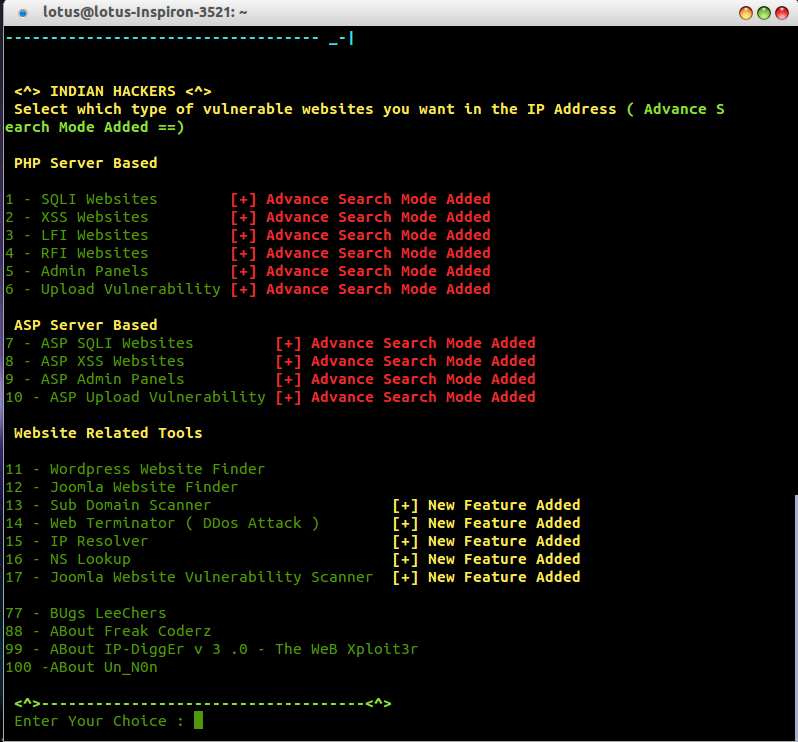
Backtrack/ Kali မွာဆုိရင္ Terminal ကေန ./ip-digger.x.x.sh ဆုိျပီး Run ရုံပါပဲ။ အေသးစိတ္ကေတာ့ ပုံမွာေတြ႔တဲ့အတုိင္းပါပဲ။ Ubuntu မွာဆုိရင္ chmod 777 ေပးျပီး run ေပးဖုိ႔လုိေကာင္းလုိပါလိမ့္မယ္။
[Download]
Read more »
[Download]
12/20/2013
LFI Server Scanner
Don't ask me how and where to use it. I don't know really :(
Virustotal: https://www.virustotal.com/en/file/17da98c633d90be74c9c85d26dac8c84271a8135f40ef6ce36c0e46b26b34df2/analysis/1387476034/
[Download]
Read more »
Virustotal: https://www.virustotal.com/en/file/17da98c633d90be74c9c85d26dac8c84271a8135f40ef6ce36c0e46b26b34df2/analysis/1387476034/
[Download]
Labels:
Hacking Tools
12/19/2013
BTS Pen-testing Lab
DVWA, Mutillidae စတဲ့ pen-testing lab ေတြလုိပါပဲ။ ဒီ Lab မွာလည္း ကြ်န္ေတာ္တုိ႔အေနနဲ႔ ေအာက္ပါ vulnerability ေတြကုိ ေလ့လာႏုိင္မွာျဖစ္ပါတယ္။ SQL injection ထုိးမယ့္ဆရာသမားေတြကေတာ့ ေဆာင္ထားလုိက္ေတာ့ဗ်ာ။ ဖုိင္ဆုိဒ္ကလည္း ေသးေသးေလးရယ္။ Installation ပုိင္းအေသးစိတ္ကုိေတာ့ မေျပာေတာ့ဘူးေနာ္။
SQL Injection
Cross Site scripting(XSS)
Cross Site request Forgery(CSRF)
Clickjacking
Server Side Request Forgery(SSRF))
File Inclusion(RFI and LFI)
Command Execution
Installation:
1. Install XAMPP or WAMPP in your machine
2. Extract the bts_lab zip file into the htdocs folder.
3. Open the "http://localhost/bts_lab/setup.php" url in your browser.
4. Click the Setup.
[Screenshot]
[Download]
Read more »
SQL Injection
Cross Site scripting(XSS)
Cross Site request Forgery(CSRF)
Clickjacking
Server Side Request Forgery(SSRF))
File Inclusion(RFI and LFI)
Command Execution
Installation:
1. Install XAMPP or WAMPP in your machine
2. Extract the bts_lab zip file into the htdocs folder.
3. Open the "http://localhost/bts_lab/setup.php" url in your browser.
4. Click the Setup.
[Screenshot]
[Download]
Labels:
Pen-Testing
Subscribe to:
Posts (Atom)